Sections of this topic

The importance of IT and project management software is growing every day, with new titles and solutions appearing in the market. One of the well-known platforms in this field is NinjaOne. It provides services for IT management, monitoring, security, and automation.
This software is cloud-based and offers impressive automation features that can ensure security and automate tasks to make the whole process easier with less effort and energy for the IT teams, and not only.
But does it really deliver the results you’re looking for your business? In this guide, we’ll break down everything you need to know: features, supported endpoints, pricing plans, and the pros and cons.
TRY NINJAONE TODAY WITH A 14-DAY FREE TRIAL
Table of Content: NinjaOne review
- NinjaOne review: Top features explained
- NinjaOne pricing plan breakdown
- NinjaOne vs AnyDesk
- NinjaOne review: pros and cons
- FAQ
NinjaOne review: Top features explained
As previously noted, NinjaOne stands out with its highly automated features that allow teams to streamline their workflow and make task management easier. Let’s get closer to the main features of NinjaOne and understand what it brings to the table as a good IT management software.
Centralized endpoint management and automation
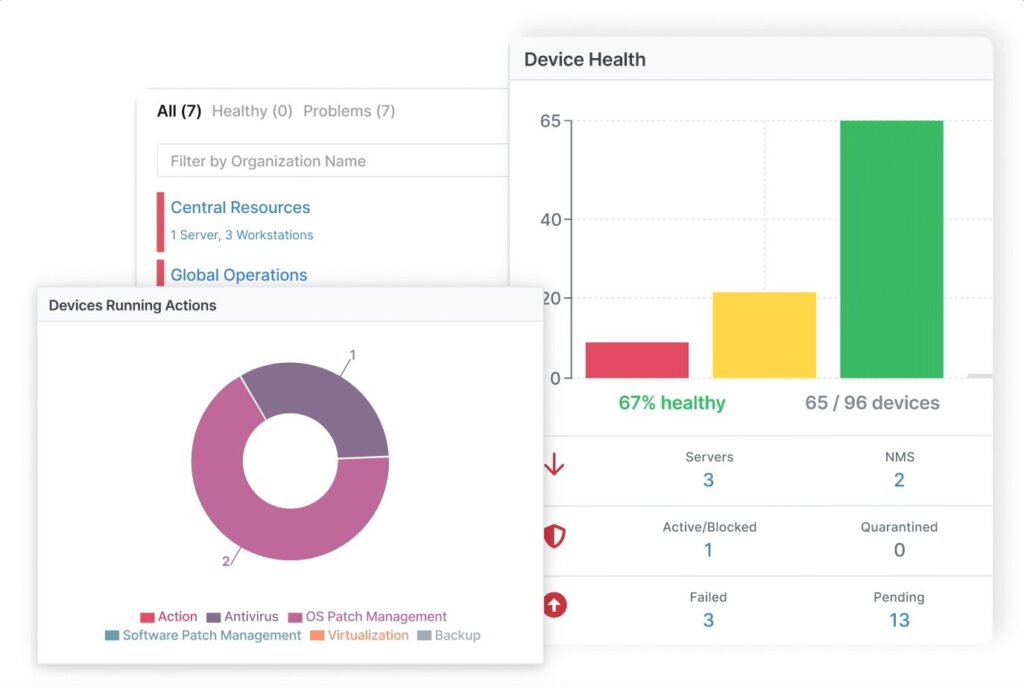
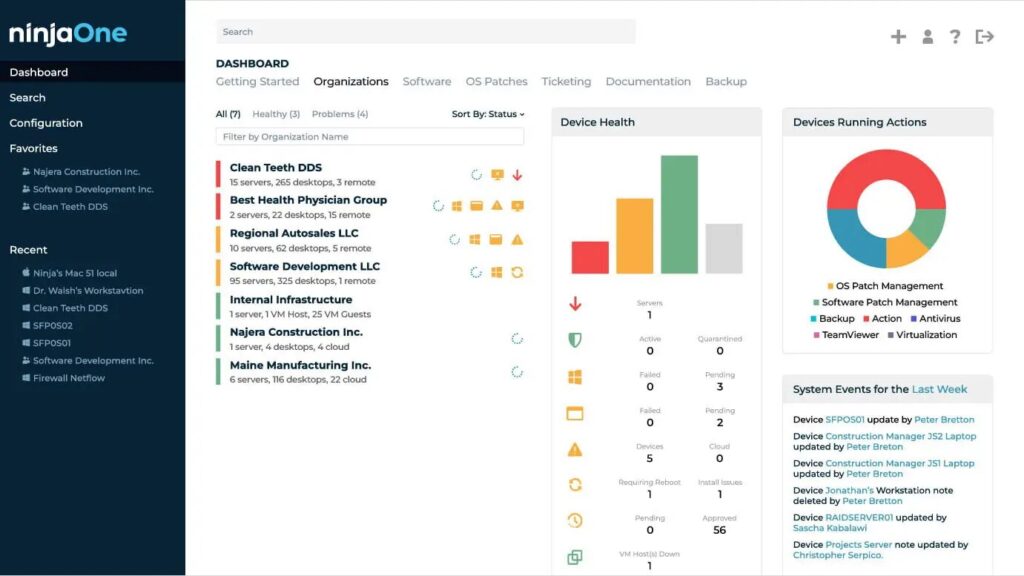
NinjaOne offers a single, cloud-based console where IT teams can manage all their endpoints, whether they run on Windows, macOS, Linux, or even SNMP-enabled devices like printers and switches. This centralized control makes it easier to track device health, monitor performance, and enforce policies across large environments.
The real value, however, comes from its automation engine. Administrators can deploy scripts, push updates, or trigger workflows based on conditions such as low disk space or failed services.
This not only reduces manual workload but also ensures proactive issue fixation. In practice, that means fewer service disruptions and faster response times for users.
Remote access, monitoring, and alerts
With NinjaOne, technicians don’t need to be physically present to troubleshoot devices. The platform enables secure remote access with just one click, allowing IT staff to take control, perform fixes, or guide end-users in real time.
The system also provides real-time monitoring of critical metrics like CPU usage, memory consumption, and network activity. When something goes wrong, customizable alerts notify the right people through email, SMS, Slack, or even integrated ticketing tools. Combined with automated remediation, these alerts help minimize downtimes.
Ticketing and Documentation
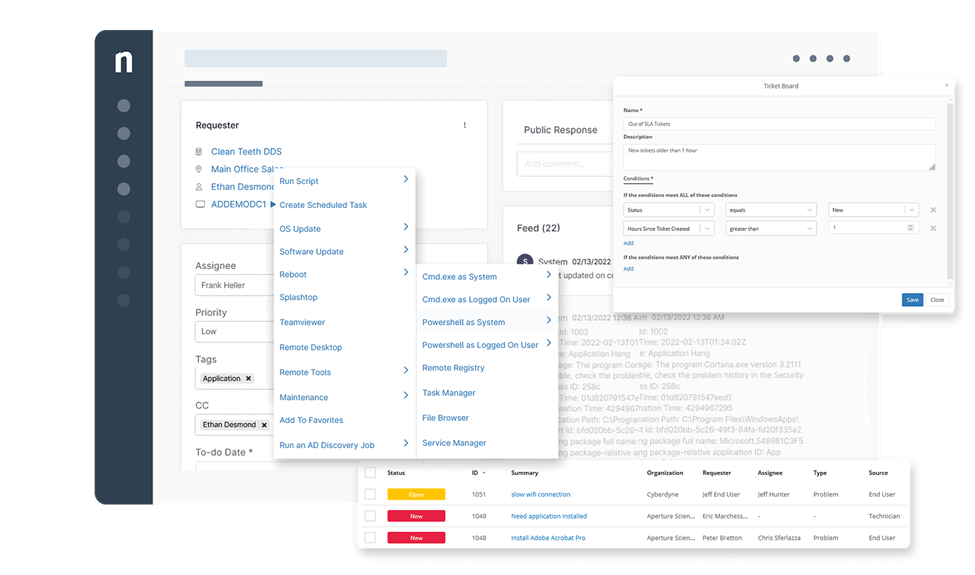
NinjaOne includes a lightweight ticketing system that fits naturally into IT workflows. Tickets can be generated automatically from alerts or submitted by users through multiple channels, then routed to the right technician.
On top of this, NinjaOne provides a built-in documentation hub, where teams can create and store process guides, knowledge base articles, and asset documentation. This reduces knowledge caps and helps new technicians onboard faster.
Integrations and Extensibility
Everyone will agree that no IT tool works in isolation, and NinjaOne recognizes this by offering a wide range of third-party integrations. From authentication providers like Okta and Azure AD, to collaboration tools like Teams and Slack, NinjaOne fits smoothly into existing IT ecosystems.
Additionally, its open API makes it possible to extend functionality and build custom integrations, which is crucial for larger organizations with unique workflows.
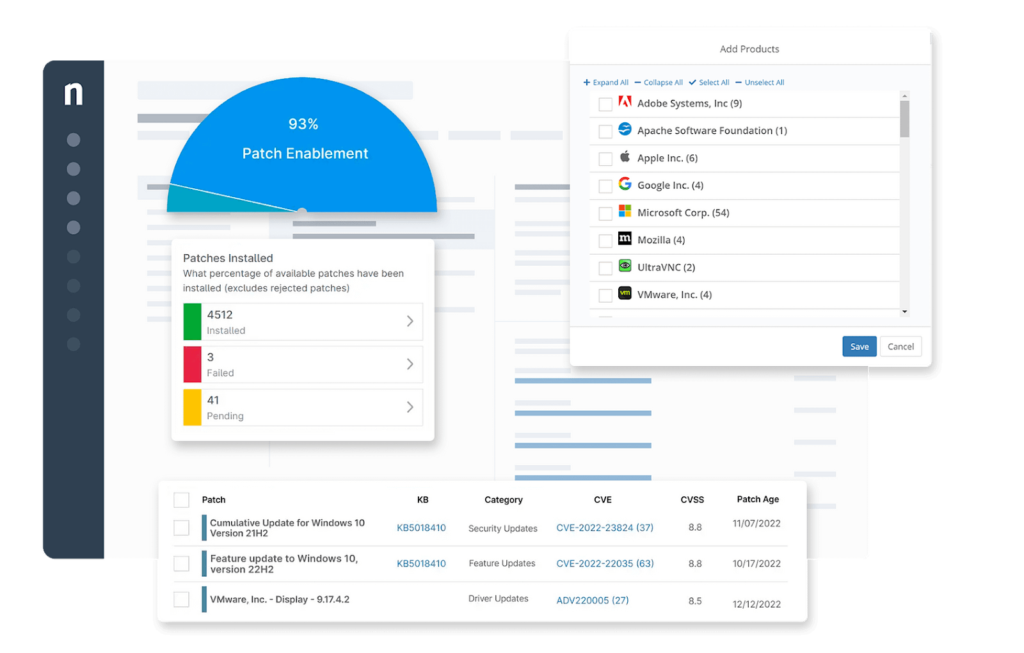
Patch management
And finally, it offers patch management. Keeping systems up to date is one of the biggest challenges for IT teams. NinjaOne simplifies this with automated patch management for both operating systems and third-party applications.
What’s particularly useful is NinjaOne’s ability to provide patch intelligence, helping teams decide whether a new update is stable enough before the massive deployment. This, of course, reduces the risk of failed patches affecting business operations.
AUTOMATE YOUR IT MANAGEMENT WITH NINJA ONE NOW
NinjaOne pricing plan breakdown
NinjaOne’s pricing is flexible: you can pay monthly or manually with their flexible contracts. The pricing is mostly custom: with that said, your pricing depends on the quantity of the projects, the endpoints you manage, and the modules you need.
Teams can start with $3 for each endpoint and then upgrade to enterprise or professional subscriptions for the advanced features.
As we mentioned earlier, NinjaOne’s pricing is competitive and higher than the competitors, but with all the features that it offers and a highly automated environment, it brings the best quality to the table, which is an important factor when it comes to IT and remote management.
For teams that want to test the software first and then commit to a subscription, NinjaOne has a 14-day free trial, which allows users to use all the features and functionalities and try everything in real life before making a decision. Here is a quick snapshot of NinjaOne’s pricing.
| Plan | Starting Price* | Best For | Key Features |
| Basic (Per-endpoint) | From $3 per endpoint/month | Small IT teams, startups | Endpoint monitoring, basic automation, remote access, and patch management |
| Professional | Custom quote (avg. $5–7 per endpoint/month) | Growing businesses, MSPs | Advanced automation, documentation hub, integrations, ticketing |
| Enterprise | Custom quote (avg. $7–9 per endpoint/month) | Large organizations, multi-client IT departments | Full-scale IT management, advanced reporting, API access, premium support |
| Free Trial | 14-day free trial | Anyone who wants to test before subscribing | Full access to all features, no upfront payment required |
START FOR AS LOW AS $3 PER ENDPOINT
NinjaOne vs AnyDesk
There are a lot of different names that compete with NinjaOne as an IT and remote access management software. One of the popular names is AnyDesk. While NinjaOne is a full-scale IT management platform, AnyDesk takes a very different approach.
It is best known as a remote desktop software that allows users to connect to devices quickly and securely. So, when it comes to remote management, AnyDesk starts to compete with NinjaOne. Let’s take a look at its features.
What AnyDesk Offers for IT teams
- Remote access: AnyDesk is extremely fast to install and runs on a minimal footprint, making it ideal for quick support sessions or remote work.
- Cross-platform support: It supports Windows, macOS, Linux, Android, iOS, and even Raspberry Pi, which makes it flexible across environments.
- Security: Features include TLS 1.2 encryption, device authentication, and access control lists, ensuring that remote connections remain secure.
- Collaboration tools: Beyond IT, AnyDesk is often used for screen sharing, file transfer, and remote collaboration, particularly for distributed teams.
- Use cases: It’s best for freelancers, small teams, and companies that primarily need remote connectivity rather than full endpoint management.
Feature comparison: NinjaOne vs AnyDesk
| Features/Compatibility | NinjaOne | AnyDesk |
| Primary Focus | IT management (RMM, monitoring, patching, automation, backup, documentation) | Remote desktop and collaboration |
| Endpoint Management | Centralized management for Windows, macOS, Linux, servers, and SNMP devices | Not supported |
| Automation | Advanced scripting engine, automated remediation, and patch scheduling | No automation |
| Remote Access | Built-in and via integrations (TeamViewer, NinjaOne Viewer) | Core feature with fast, lightweight access |
| Integrations | Wide range (PSA, cloud, authentication, security tools) | Very limited |
| Patch Management | Automated OS + 3rd-party patching with compliance reporting | Not supported |
| Ease of Use | Streamlined for IT teams, some onboarding needed | Very easy for end-users and quick setup |
| Best For | MSPs and IT departments that need full control of devices and networks | Individuals, small teams, or businesses needing simple remote access |
LEVEL UP YOUR IT PROJECT MANAGEMENT TODAY WITH THE BEST DEAL
NinjaOne Review: Pros and cons
Like every software, NinjaOne also has its pros and cons. We summarized some pros and cons for our readers as a quick guide to see where it works and where it doesn’t.
What works well:
- Robust automation and monitoring
NinjaOne shines at automating routine tasks like patch deployments and remote monitoring. Real-time alerts and workflows help IT teams stay proactive.
- Scalable, cloud-based architecture
As a cloud-native software, NinjaOne deploys quickly across devices and scales well, while enabling remote work and multi-client support.
- Intuitive and responsive user interface
Many audits highlight how clean, fast, and easy to navigate NinjaOne’s interface is, which is a major usability advantage for IT teams.
Where it falls short:
- Higher Cost for Smaller Teams
While powerful, NinjaOne’s pricing can become expensive for small businesses and lean teams.
- Reporting and Customization Limitations
Advanced or deeply tailored reports are limited. Custom dashboards and UI personalization also fall short for some users.
- Client Segmentation Limitations
Managing separate client environments under a single umbrella remains tricky, making it less ideal for managed service providers who need robust multi segregation.
START WITH NINJAONE TODAY: AUTOMATE MORE AND SPEND LESS
Final verdict: How we evaluate NinjaOne
Based on all the features and opportunities that NinjaOne brings to the table, we can say that it is more than just a remote desktop tool; it’s a complete IT management software that brings automation, monitoring, endpoint control, and documentation into one streamlined platform.
While its pricing may feel high for smaller teams, the value becomes clear for IT departments and managed service providers who need reliability, security, and scalability. Compared with AnyDesk, which is lightweight and remote-access focused, NinjaOne is the stronger choice for organizations requiring full IT oversight rather than simple device connection.
If your business relies on multiple endpoints, proactive issue detection, and efficient IT workflows, we recommend NinjaOne as one of the strongest software solutions in 2025.
Frequently Asked Questions

Patrick is a financial expert with deep knowledge in trading, technical analysis, and market structure. His analytical skills and ability to simplify complex topics have made him a trusted advisor for firms looking to navigate the financial markets effectively. Recognized for his insightful reports and strategic market analysis, Patrick has earned high praise from industry professionals. He is also the host of a widely-followed podcast, where he delves into market trends, options trading, and value investing, providing actionable insights for investors and professionals alike.